Why Same-Capacity Modules Still Aren’t Always Compatible
Two memory modules can both say 64GB and still fail in the same server. This blunt guide explains why RAM compatibility depends on platform validation, module type, rank structure, ECC behavior, and supply-chain discipline—not just capacity.
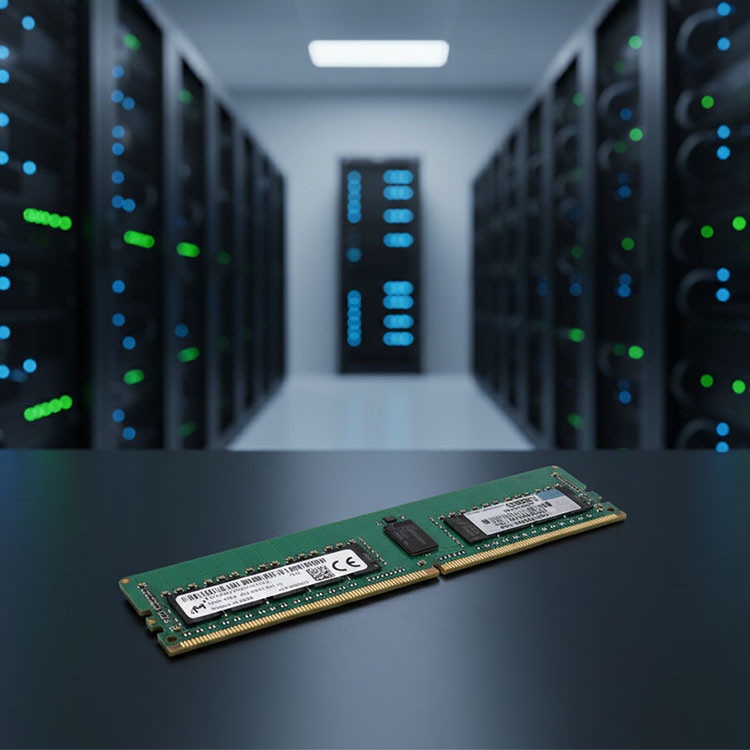
A 64GB DDR4 ECC RDIMM, a 64GB DDR4 LRDIMM, and a 64GB DDR4 ECC UDIMM can all look close enough on a rushed quote sheet, yet the memory controller, BIOS, CPU generation, and server population map may treat them as three very different animals once the machine starts training memory. So why do procurement teams still buy like the first number tells the whole story?
I have watched this go wrong in the least dramatic way possible: no smoke, no sparks, just a server sitting there like a brick during a maintenance window while everyone argues over whether “same capacity” should have been enough. It was not enough. It almost never is.
RAM compatibility is not decided by the capacity sticker. It is decided by the complete module identity: DDR generation, ECC behavior, RDIMM or LRDIMM architecture, rank, chip width, speed bin, voltage, CPU support, BIOS support, and slot population order.
That is the part many sellers avoid saying out loud.
ServerDIMM’s own guide on mixing server RAM gets the framing right: the real risk is not just brand mixing; it is type, generation, ECC behavior, rank, capacity layout, CPU socket symmetry, BIOS support, and silent downclocking. That is the adult conversation. Not “Samsung or Micron?” Not “32GB or 64GB?” The real question is whether the platform will validate the installed configuration.
Capacity Is a Number. Compatibility Is a System.
Here is the blunt version: same-capacity modules can fail because servers do not buy memory; platforms validate memory.
Dell’s PowerEdge guidance says RDIMMs and LRDIMMs cannot be mixed, dual-CPU memory layouts must match in size and position, and some upgrades allow only two capacity sizes—not three. Dell’s R750 manual also warns that memory configurations may fail to boot, stop responding during memory configuration, or operate with reduced memory if installation rules are ignored. Read that again through the lens of real downtime, not brochure copy: Dell PowerEdge memory configuration guidance and Dell R750 general memory installation guidelines.
Same label. Different machine.
A buyer sees “64GB DDR4.” The server sees channel balance, rank load, signal integrity, SPD data, firmware expectations, and whether the CPU’s integrated memory controller is being asked to do something the vendor never validated. Which view do you think wins?
The Compatibility Stack Nobody Wants on the Quote Sheet
Most bad RAM purchases happen because the quote is written for a human skim, not a server boot sequence. The module description says “64GB DDR4 ECC server memory,” and everyone relaxes. They should not.
Exact manufacturer part number: for example, SK hynix HMA84GR7AFR4N-VK or Micron MTA36ASF8G72PZ
Slot population map
BIOS or firmware support level
This is why I like ServerDIMM’s practical guide on how to read a server memory part number. It treats the part number as evidence, not decoration. That is the right instinct.
Where Same-Capacity Modules Break
The industry likes tidy labels. Servers do not.
Compatibility Factor
Why Same Capacity Still Fails
Real-World Example
What I Would Check First
RDIMM vs LRDIMM
Different buffering behavior can make the modules mutually unsupported
64GB DDR4 RDIMM mixed with 64GB DDR4 LRDIMM
Server manual and installed module type
Rank structure
Two same-capacity DIMMs can use different internal layouts
64GB 2Rx4 vs 64GB 4Rx4
Full MPN and rank notation
ECC behavior
ECC and non-ECC are not interchangeable in production servers
ECC UDIMM ordered for RDIMM-only rack server
Platform memory specification
DDR generation
DDR4 and DDR5 are physically and electrically different families
DDR4-3200 vs DDR5-4800
Server generation and slot type
Speed bin
Mixed speeds may force slowest common speed or fail validation
2933 MT/s mixed with 3200 MT/s
CPU max speed and DIMM population table
CPU socket symmetry
Dual-socket systems often expect mirrored memory layout
CPU1 has 6 DIMMs, CPU2 has 4 DIMMs
A/B socket population order
BIOS support
Firmware may reject or mis-handle unsupported density
96GB DDR5 RDIMM on older BIOS
BIOS release notes and QVL
Supply identity
Relabeled, substitute, or mismatched lots can cause rollout chaos
“Equivalent” part shipped under vague listing
Label photos, MPN, warranty terms
I know this sounds picky. Good.
Picky is what saves a Saturday maintenance window.
The RDIMM vs LRDIMM Trap
This one keeps happening because the modules look too similar for their own good.
RDIMM means registered DIMM. LRDIMM means load-reduced DIMM. Both are common in servers. Both can be ECC. Both can be DDR4. Both can be 64GB or 128GB. And no, that does not mean they can live together in the same box.
Dell’s R740 guidance is direct: RDIMMs and LRDIMMs cannot be mixed in that upgrade path. That is not a style preference. It is a platform rule.
A 64GB RDIMM and a 64GB LRDIMM may solve the same capacity problem on paper, but they do not present the same electrical and buffering profile to the memory controller. In a real server, that difference can mean no POST, memory initialization failure, reduced performance, or an unsupported configuration that nobody wants to defend after the incident report.
If the installed estate is already running DDR4 RDIMM, stay in that family unless the platform guide says otherwise. If the machine is moving to high-density DDR5, confirm whether the server supports RDIMM, LRDIMM, 3DS RDIMM, or a specific density class before chasing a bigger module. ServerDIMM’s DDR4 and DDR5 server memory sourcing page is built around that kind of compatibility-led quote process, which is exactly how enterprise buyers should think.
Rank, Width, and the Part Number Nobody Reads
Two modules can both be 32GB DDR4-3200 ECC RDIMM and still differ in rank and chip organization.
That is where the lazy buyer loses.
Rank notation such as 1Rx8, 2Rx4, 4Rx4, or 2S2Rx4 tells you how the DIMM is organized internally. This affects supported density, load, interleaving, channel behavior, and sometimes whether a platform accepts the module at all. The number before the R is not filler. The x4 or x8 is not trivia. It is part of the module’s identity.
I once saw a team reorder “the same 32GB modules” based on a marketplace title. The first batch was 2Rx4. The second batch was not. The receiving team did not photograph labels, did not capture MPNs, and did not run a pilot node. Then the blame tour started.
That is why I would tie this topic to ServerDIMM’s server memory part number guide and quality and warranty process. The boring steps—label verification, part-number confirmation, lot review, and pre-shipment screening—are exactly what stop “same capacity” from becoming “same outage.”
The Data Says Memory Is Not Harmless
Here is the part that irritates me: too many people treat RAM like a passive commodity.
It is not.
Google Research’s large-scale field study, DRAM Errors in the Wild, analyzed memory errors across a large fleet of commodity servers over 2.5 years, covering multiple vendors, DRAM capacities, technologies, and many millions of DIMM days. The study reported 25,000 to 70,000 errors per billion device hours per Mbit and more than 8% of DIMMs affected by errors per year.
That should make every buyer less casual.
Not terrified. Just less casual.
The study was not about “same-capacity incompatibility” directly, but it proves the bigger point: memory behavior in production is measurable, messy, and operationally expensive. If DRAM errors are real at scale, then sloppy compatibility assumptions deserve no sympathy.
And the market has become less forgiving. Reuters reported in December 2025 that AI demand was driving a memory chip supply crisis, with Samsung raising server memory chip prices by up to 60% in one month and major cloud buyers pressing suppliers for open-ended memory orders. See Reuters’ reporting on AI-driven memory chip pressure.
So now a bad RAM decision does two things. It burns uptime. It burns budget.
The Supply Chain Problem Nobody Wants in the Meeting
There is another uncomfortable angle: when memory gets expensive, substitutions get more tempting.
And substitutions are where vague specs become dangerous.
The U.S. Department of Justice announced in May 2024 that Onur Aksoy was sentenced to 78 months in prison for a massive counterfeit Cisco equipment scheme involving counterfeit and low-quality networking equipment that reached hospitals, schools, government systems, and military-related applications. Read the DOJ release: counterfeit Cisco networking equipment case.
No, that was not a RAM case. But pretending the lesson does not apply to enterprise hardware procurement is naive.
When a market tightens, buyers start accepting “equivalent,” “compatible,” “same capacity,” “tested pull,” and “OEM-grade” without demanding the exact part number, label photos, traceable lots, and warranty terms. That is how risk walks in wearing a discount badge.
CISA also warns that ICT supply chain weaknesses can include counterfeit components, flawed product designs, poor manufacturing, malicious hardware, and other supplier-origin risks. Their page on ICT supply chain security is written for cyber risk, but the procurement lesson is the same: identity control matters.
A server memory purchase should not be a mystery box.
Why DDR4 RAM Compatibility Still Bites in 2026
DDR4 is not dead. It is just getting more political.
Many installed server fleets still run DDR4: Dell PowerEdge R640/R740/R750, HPE ProLiant Gen10, Lenovo ThinkSystem SR650, Cisco UCS M5, and Supermicro X11/X12 platforms. That means DDR4 compatibility is still a live procurement problem, especially for maintenance, refresh, spares, and capacity upgrades.
But DDR4 supply has become more complicated as manufacturers shift attention toward DDR5, HBM, and AI data center demand. Reuters reported that Samsung had told customers in May 2024 it planned to end production of one type of DDR4 chips before later changing course, while Micron told customers in June it would stop shipping DDR4 and LPDDR4 in six to nine months. That is exactly the kind of market noise that makes “same-capacity substitute” offers more common.
This is where buyers need discipline.
If you are extending DDR4 infrastructure, do not just buy 32GB or 64GB modules because the price looks good. Confirm whether you need ECC RDIMM, ECC LRDIMM, 2Rx4, 4Rx4, 2666 MT/s, 2933 MT/s, or 3200 MT/s, and whether your BIOS supports the target density. ServerDIMM’s guide to buying server memory makes the same practical point: server memory must match server model, CPU generation, memory channel rules, DIMM type, rank, supported speed, and workload requirement.
That is the checklist. Not optional.
Dual Channel, Multi-Channel, and the Performance Penalty Nobody Quotes
Compatibility is not only about booting.
A bad memory layout can boot and still be wrong.
Dual channel, quad channel, six channel, eight channel, and twelve channel memory designs depend on balanced population. On many server platforms, mismatched capacity placement across channels or sockets can reduce bandwidth, disable optimal interleaving, or trigger non-ideal memory modes.
This is where buyers get tricked by partial success. The server starts. The operating system sees memory. Everyone celebrates. Then database latency looks strange, virtualization density disappoints, or the system runs below the expected MT/s because the memory controller chose the safest common behavior.
Dell’s R750 guidance says different-speed modules operate at the speed of the slowest installed modules, and unbalanced or odd memory configurations can cause performance loss or cause the system not to identify installed memory modules. That is a strong warning for anyone mixing same-capacity modules across sockets without checking the slot map.
Booting is not the same as being right.
My Compatibility Checklist Before Approving Same-Capacity RAM
I would not approve a same-capacity module swap until these checks are done:
Confirm the exact server model and CPU generation.
Pull the vendor memory population guide.
Record the installed DIMM label fields: capacity, DDR generation, ECC, RDIMM/LRDIMM, speed, rank, chip width, and MPN.
Verify BIOS support for the target density.
Match module class before brand.
Match rank and organization when continuity matters.
Check slot population order for single-CPU and dual-CPU systems.
Confirm whether mixed capacities are supported and how many capacity types are allowed.
Confirm whether different speeds will downclock.
Run a pilot node before bulk deployment.
Photograph labels before receiving acceptance.
Keep warranty and replacement terms tied to the exact supplied part.
That last point matters. A replacement policy that allows random “compatible” substitutes is not a replacement policy. It is a future argument.
If your server memory is not detected after installation, ServerDIMM’s article on why server memory is not detected gives the right diagnosis pattern: module family, RDIMM versus LRDIMM, ECC behavior, 3DS RDIMM rules, and platform fit all need to be checked before blaming the slot.
FAQs
Why are same-capacity RAM modules not always compatible?
Same-capacity RAM modules are not always compatible because capacity is only one field in a larger electrical and platform validation profile that includes DDR generation, ECC support, RDIMM or LRDIMM type, rank structure, speed bin, voltage, BIOS support, CPU memory-controller limits, and motherboard population rules. Two 64GB DIMMs can be technically different enough to fail.
In practice, the safest workflow is to compare the full manufacturer part number, installed server model, CPU generation, and memory population guide before buying a replacement or upgrade. “Same GB” is not a compatibility test.
Can I mix RAM modules with the same capacity?
You can mix same-capacity RAM modules only when the motherboard or server platform supports the full technical combination, including memory generation, module type, ECC status, speed, rank, chip organization, and slot placement. Same capacity may help with balance, but it does not override vendor rules or memory-controller limits.
For a desktop, the system may simply downclock. For a server, it may refuse to POST, disable features, show unsupported population warnings, or run in a reduced-performance mode.
Is DDR4 RAM compatibility only about DDR4 versus DDR5?
DDR4 RAM compatibility is not only about DDR4 versus DDR5 because DDR4 modules still vary by ECC support, registered or load-reduced design, rank count, chip width, speed grade, voltage behavior, and platform validation. A DDR4 ECC RDIMM and a DDR4 ECC LRDIMM can share generation and capacity while remaining unsupported together.
For server buyers, DDR4 compatibility should always be checked against the exact platform manual, not just the module’s generation label.
Can RDIMM and LRDIMM be mixed if both modules are the same size?
RDIMM and LRDIMM generally should not be mixed in the same server even when both modules have the same capacity, because they use different buffering and load-reduction architectures that many enterprise platforms explicitly reject. The result can be failed memory initialization, no boot, unsupported configuration warnings, or unstable production behavior.
If the installed system is RDIMM-based, continue with RDIMM unless the vendor memory guide supports a migration plan. If the system is LRDIMM-based, stay in that lane.
Does mixing RAM speeds cause compatibility problems?
Mixing RAM speeds can cause compatibility problems because the system may downclock all installed memory to the slowest supported speed, select a safer common timing profile, or reject the configuration if the speed combination violates platform rules. Speed mixing is often less dangerous than type mixing, but it can still reduce performance or complicate validation.
For production servers, I would rather buy the right speed and rank combination than rely on automatic downclocking as a procurement strategy.
How do I check motherboard RAM compatibility before buying?
Motherboard RAM compatibility is checked by matching the board or server model, CPU generation, chipset limits, supported DDR generation, DIMM type, ECC support, rank limits, speed limits, maximum density, BIOS version, and slot population rules against the exact memory module part number. The correct source is the vendor manual or approved memory list.
For server environments, also compare the installed memory layout across CPU sockets and channels before adding capacity. Balanced population matters for performance and detection.
Your Next Steps
Do not buy server RAM by capacity alone.
Before approving a quote, send the supplier your server model, CPU generation, current DIMM label photos, desired capacity target, installed memory layout, preferred module class, and deployment quantity. Ask them to confirm the exact MPN, RDIMM or LRDIMM type, ECC support, rank, speed, warranty terms, and whether the proposed modules fit the platform population rules.
If you are sourcing DDR4 or DDR5 memory for a fleet, start with a compatibility-led supplier conversation through ServerDIMM’s bulk server RAM sourcing page. If the buy is large enough to hurt, test a pilot node first. Then scale.
ServerDimm supplies new and used branded server memory for distributors, OEM buyers, resellers, and data center teams. We support DDR4 and DDR5 sourcing with tested inventory, compatibility checks, and responsive quote service.