Most buyers read server memory labels like they are shopping for consumer RAM. That is how projects get burned. This guide shows how I read a server memory part number in the real world, what each field means, where buyers get fooled, and which details you should force into every quote before you approve a PO.
A server memory part number looks like alphabet soup only when you read it like a retail sticker, because enterprise DIMMs usually encode capacity, DDR generation, speed bin, ECC status, module class, rank structure, chip width, and the exact manufacturer identity that determines whether the part will boot, downclock, or waste your maintenance window. Why do so many buyers still stare at “64GB” and ignore the rest?
I’ve seen this mistake too many times. One team buys on capacity alone, another buys on a reseller title, and then both act offended when the server refuses to train memory, drops speed, or rejects the module class outright. Intel’s own server guidance says mixing DDR4 DIMM types such as RDIMM and LRDIMM is not supported and can trigger a fatal error halt during memory initialization; it also notes mixed speeds can force the system to run at the highest common frequency and lowest latency available. That is not a minor footnote. That is the job. Read Intel’s supported memory and population rules.
And the money got uglier. On January 5, 2026, Reuters reported that prices in some memory segments had more than doubled since February 2025 as AI demand pulled manufacturing capacity toward higher-margin products, which means one bad suffix or wrong module type now hurts both uptime and budget at the same time. Why would anyone sign a PO on a “same spec” promise in that market? Read Reuters on the January 2026 memory squeeze.
A server RAM part number is really a stack of decisions
Here’s the trick. The part number is not one thing.
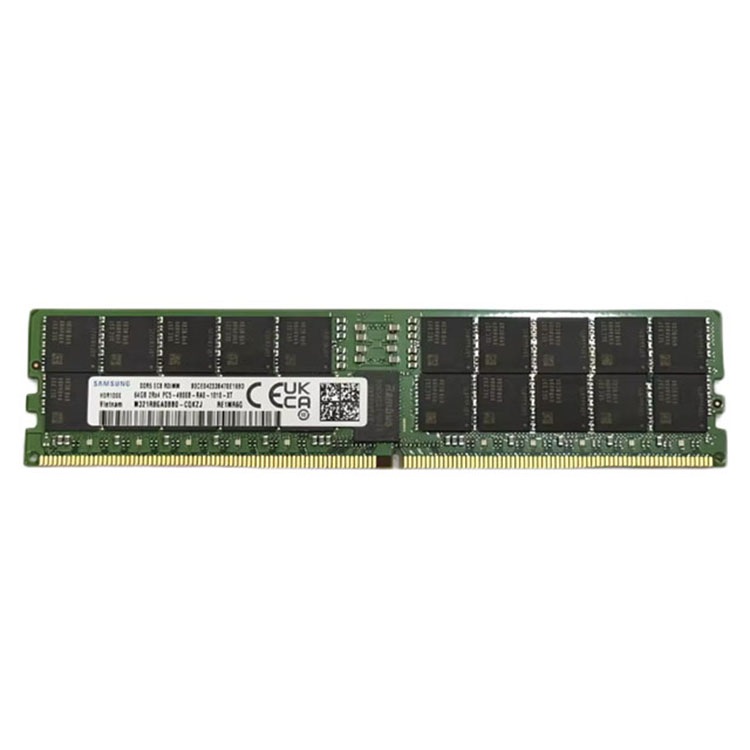
In practice, I read a server memory label in layers: first the visible commercial string such as 32GB, DDR4, 2666, 2Rx4, ECC, RDIMM; then the exact OEM manufacturer code such as SK hynix HMA84GR7AFR4N-VK or SK hynix HMCG94AEBRA109N, because the first layer tells me the class of module I am looking at and the second tells me whether reorder, receiving, RMA, and cross-lot matching will stay clean. Isn’t that what professionals are actually paying for?
Manufacturers themselves make this plain. Kingston publishes a Memory Part Number Decoder, and Micron publishes a module part numbering guide, because these strings are structured by design, not decorated by marketing interns. That is the hard truth a lot of “compatible with” listings would rather you ignore.
The fields I read first
I read this part fast. Then I read it again slower.
Capacity tells me density, not fit. DDR4 or DDR5 tells me the platform era. ECC tells me I’m still in grown-up territory. RDIMM or LRDIMM tells me whether the module class belongs in the box at all. Rank notation like 1Rx8, 2Rx4, or 4Rx4 tells me more about organization and compatibility behavior than most buyers want to admit. And the exact manufacturer code tells me whether I can buy the same thing again six months later without starting another blame loop.
Label field
Example
What it actually tells you
Why buyers get burned
Capacity
32GB / 64GB / 96GB / 128GB
Per-module density
Capacity alone does not prove fit
DDR generation
DDR4 / DDR5 / PC4 / PC5
Platform era and electrical family
Wrong generation will never train
ECC
ECC
Error-correcting server memory class
Some buyers still miss this on mixed listings
Module class
RDIMM / LRDIMM
Buffered architecture
Wrong class can fail POST outright
Rank and width
1Rx8 / 2Rx4 / 4Rx4
Module organization
Two 64GB modules can behave very differently
Exact MPN
HMA84GR7AFR4N-VK
Vendor-specific identity
Reorders, RMAs, and lot matching get messy fast
That table is not theory. ServerDimm’s live DDR5 category is already showing parts such as Genuine Micron 96GB DDR5 5600 2RX4 Server RAM and Genuine SK Hynix 128GB DDR5 4800 2S2RX4 Server Module, and those visible fields are exactly the ones procurement teams should be reading before they argue about price. Browse the live DDR5 server memory catalog if you want a real-world view of how these strings appear in the wild.
The field most buyers stop at too early
This one annoys me. “64GB” is not a decoder.
A 64GB RDIMM and a 64GB LRDIMM are not interchangeable just because the first number matches, and Intel is explicit that mixing unsupported DIMM types across channels or sockets can halt memory initialization. I do not know why this still surprises people in 2026. Maybe because too many quote sheets are written to look simple instead of written to be safe. Read the full server memory compatibility checks guide before you let anyone substitute a part by “same capacity.”
Where a real memory module part number decoder earns its keep
Bad assumptions travel fast. Failed installs travel faster.
The first place buyers get trapped is RDIMM vs LRDIMM. The second is rank and chip width. The third is trained speed versus printed speed. And yes, the market is unforgiving enough now that getting any of those wrong can cost more than the module itself. A serious supplier should review generation, module type, part number, and capacity before the order moves forward; ServerDimm’s own quality page says exactly that, which is one reason I would rather see a tight validation workflow than another vague “best price” email. Review the site’s quality testing and warranty support for server memory page if you want the adult version of this conversation.
There is also a supply-chain reason to care about exact identifiers. In May 2024, the U.S. Department of Justice announced a six-and-a-half-year prison sentence for the leader of a massive counterfeit Cisco equipment scheme, which is not a memory case but absolutely is an enterprise hardware case, and the lesson carries over cleanly: sloppy identity control in infrastructure procurement is not a harmless clerical issue. Read the DOJ announcement on counterfeit Cisco equipment.
And density matters more now. The U.S. Department of Energy said data centers consumed about 176 TWh in 2023 and could rise to 325 to 580 TWh by 2028, so fields like 64GB, 96GB, and 128GB are not vanity numbers anymore; they are tied to node count, consolidation math, and power budgets. That is why I tell buyers to connect part-number reading with workload sizing, not treat them as separate chores. Read how much memory a virtualization host really needs if your team keeps buying DIMMs before doing honest host sizing.
My blunt workflow for reading server RAM part numbers in under a minute
Do this first. Pull one installed DIMM.
If the server is already populated, I trust the label that is physically inside the chassis more than almost any marketplace filter, because it gives me the exact manufacturer code, the current module class, the rank notation, and the speed family that the platform is already using successfully. Why invent risk when the server is already holding evidence?
Step one: lock the platform before the memory
I start with the server model, motherboard family, CPU generation, and BIOS reality, because DDR4 versus DDR5 is not a buying preference. It is a platform gate. If the box is DDR4-only, every dreamy DDR5 quote is dead on arrival.
Step two: read the visible spec string like a prosecutor
I want capacity, generation, ECC, module class, rank, and speed in one line. If the quote does not state those fields cleanly, I assume the supplier wants room to improvise later. That is not flexibility. That is bait.
Step three: force the full manufacturer part number into the quote
This is where lazy buyers lose control. A serious quote pack should list the exact manufacturer part number, capacity, speed, ECC type, RDIMM or LRDIMM format, rank, inventory condition, and warranty terms. ServerDimm says the same thing in its supply-partner guidance, and I agree with it completely. Read that line item as law, not advice: how to evaluate a long-term server memory supply partner.
Step four: decide whether the job is a new-memory job or a continuity job
This matters. If you are extending an older DDR4 estate, exact-fit tested inventory may be the smartest buy on the table. If you are standing up new DDR5 infrastructure with 96GB or 128GB modules, fresh inventory and repeatability may deserve the premium. That is why I would naturally route readers from this article into new vs tested used server memory once they understand the label itself.
Step five: pilot before you boast
I do not care how neat the spreadsheet looks. If the rollout is material, test the lot on real hardware before you touch the whole estate. ServerDimm’s pilot-testing article is right on this point, and frankly the industry learned the same lesson the expensive way long ago: weak validation scales failure faster than it scales savings. That is why I would send larger buyers straight into pilot testing before a bulk memory rollout before they turn a quote into a warehouse event.
FAQs
What is a server memory part number?
A server memory part number is the structured identifier printed on a DIMM label or quote that combines the module’s capacity, memory generation, ECC class, buffer type, rank layout, speed family, and manufacturer-specific identity so buyers can verify platform fit, reorder accuracy, and warranty traceability before purchase. It is not just a stock code; it is the technical fingerprint of the module.
How do I read a server RAM part number?
You read a server RAM part number by separating the visible commercial fields first, such as 64GB, DDR5, ECC, RDIMM, and 2Rx4, and then confirming the exact OEM manufacturer code so the quote matches the platform, the installed memory population rules, and the supplier’s reorder or RMA path. I start with platform fit, not the price column.
What does 2Rx4 mean on a server DIMM?
2Rx4 means the module is organized as two ranks using x4 DRAM devices, which gives you a fast shorthand for how the DIMM is built internally and why two modules with the same capacity may still behave differently in platform support, density limits, and memory population rules. Buyers who skip this field are guessing.
Can I mix RDIMM and LRDIMM if the capacity matches?
No, mixing RDIMM and LRDIMM in the same server is generally unsupported because those modules use different buffering approaches and electrical behavior, so even identical capacities do not make them interchangeable across channels or sockets in enterprise systems that follow OEM and CPU population rules. Matching gigabytes does not rescue a wrong module class.
Is a DDR4 server memory model number enough to reorder safely?
A DDR4 server memory model number by itself is not enough for a safe reorder, because responsible buyers also need the full manufacturer part number, the exact RDIMM or LRDIMM class, rank notation, speed grade, existing server model, CPU family, and any approved alternates before they can claim they are buying the same thing again. I would never approve a repeat buy on “same spec” alone.
Your next step
Don’t guess again.
Pull one installed DIMM, copy the full label exactly as printed, add the server model and CPU SKU, and force every supplier to quote against that evidence instead of against your memory capacity wish list. Then send the job through server memory compatibility checks, validate the supplier process against quality testing and warranty support for server memory, and use a pilot testing before a bulk memory rollout before the order gets big enough to punish you. That is how I would read the part number, and that is how I would buy the memory.
ServerDimm supplies new and used branded server memory for distributors, OEM buyers, resellers, and data center teams. We support DDR4 and DDR5 sourcing with tested inventory, compatibility checks, and responsive quote service.